Ejento AI
Guides
QuickstartRecipesREST APIsRelease NotesFAQs
Guides
QuickstartRecipesREST APIsRelease NotesFAQs
Ejento AI
  1. Guides
  • Basic Operations
    • Features
      • Organization → Projects → Assistants → Teams Hierarchy
    • Guides
      • Login/Signup
  • Assistants
    • Overview
    • Features
      • Assistant Access Control
      • Caching Responses for Assistants
      • Assistant Evaluation
      • Evaluation Metrics
      • URL-based Chat Thread Creation and Prepopulation
      • Reasoning Patterns
      • Staging & Publishing
    • Guides
      • Add Assistant
      • Evaluate Assistant
      • Edit Assistant
      • Assistant Edit Access
      • Embed Assistant
      • Delete Assistant
      • Add Favourite Assistants
      • View Assistant Id
      • View Dataset Id
      • Voice Calling with Assistants
  • Corpus
    • Overview
    • Features
      • Corpus Permissions
      • PII Redaction
      • ETag Setup for Corpus Incremental Refresh
    • Guides
      • Assistant Corpus Setup
      • Assistant Corpus Settings
      • Corpus Access Control
      • Corpus Connections
      • View Corpus Id
      • View Document Id
      • Tagging
        • Corpus tagging
        • Document tagging
  • Teams
    • Overview
    • Guides
      • Add a Team
      • Edit a Team
      • Delete a Team
      • View Team Id
  • Projects
    • Overview
    • Guides
      • Add a Project
      • Edit a Project
      • Managing Assistants in a Project
      • Delete a Project
      • View Project Id
  • User Settings
    • Overview
    • Features
      • Ejento AI User Access Levels
    • Guides
      • Add new user
      • Invite Users via Link or Email
      • View my User Id
  • API Keys
    • Overview
    • Guides
      • How to generate API Key and Auth Token
  • Workflows
    • Overview
    • Features
      • Workflow Access Control
    • Guides
      • Add Workflow
      • Workflow Chat
      • Workflow Edit Access
  • Tools
    • Overview
    • Guides
      • Tools Overview
      • Create External Tool
      • Connect Tool to Assistant
  • Analytics
    • Overview
    • Guides
      • Analyzing Data in the Analytics Dashboard
  • Chatlogs
    • Overview
    • Guides
      • Managing Chatlogs
      • View Chatlog & Chat thread Id
  • Integrations
    • Overview
    • Guides
      • Email Indexing
      • Microsoft Teams
      • Sharepoint Indexing
      • Google Drive Connector
      • MS Teams Integration Setup
      • Creating a Connection in Credential Manager
      • Slack App
      • Discord Bot
  • Ejento AI Shield
    • Overview
    • Features
      • Understanding Guardrails
    • Guides
      • How to enable Guardrails
  • Assistant Security
    • Overview
    • Features
      • Assistant Red Teaming
    • Guides
      • Red Team an Assistant
  • Permission Sets
    • Overview
    • Guides
      • Add Permission Set
  1. Guides

Corpus Access Control

1. Navigate to the Corpus section from the sidebar#

Step 1 screenshot

2. Click on Edit Corpus#

Step 2 screenshot

3. Here you can update the name of the Corpus.#

Step 3 screenshot

4. Here, you can update access permissions or remove users and teams from the Corpus.#

You cannot change the Owner’s role or remove the Owner from the Corpus. Ownership is what the “corpora they own” Permission Set scope resolves against.
Step 4 screenshot

5. Click on Add User#

Step 5 screenshot

6. Select the user you want to add to your corpus.#

Step 6 screenshot

7. Select the role of the user#

Step 11 screenshot

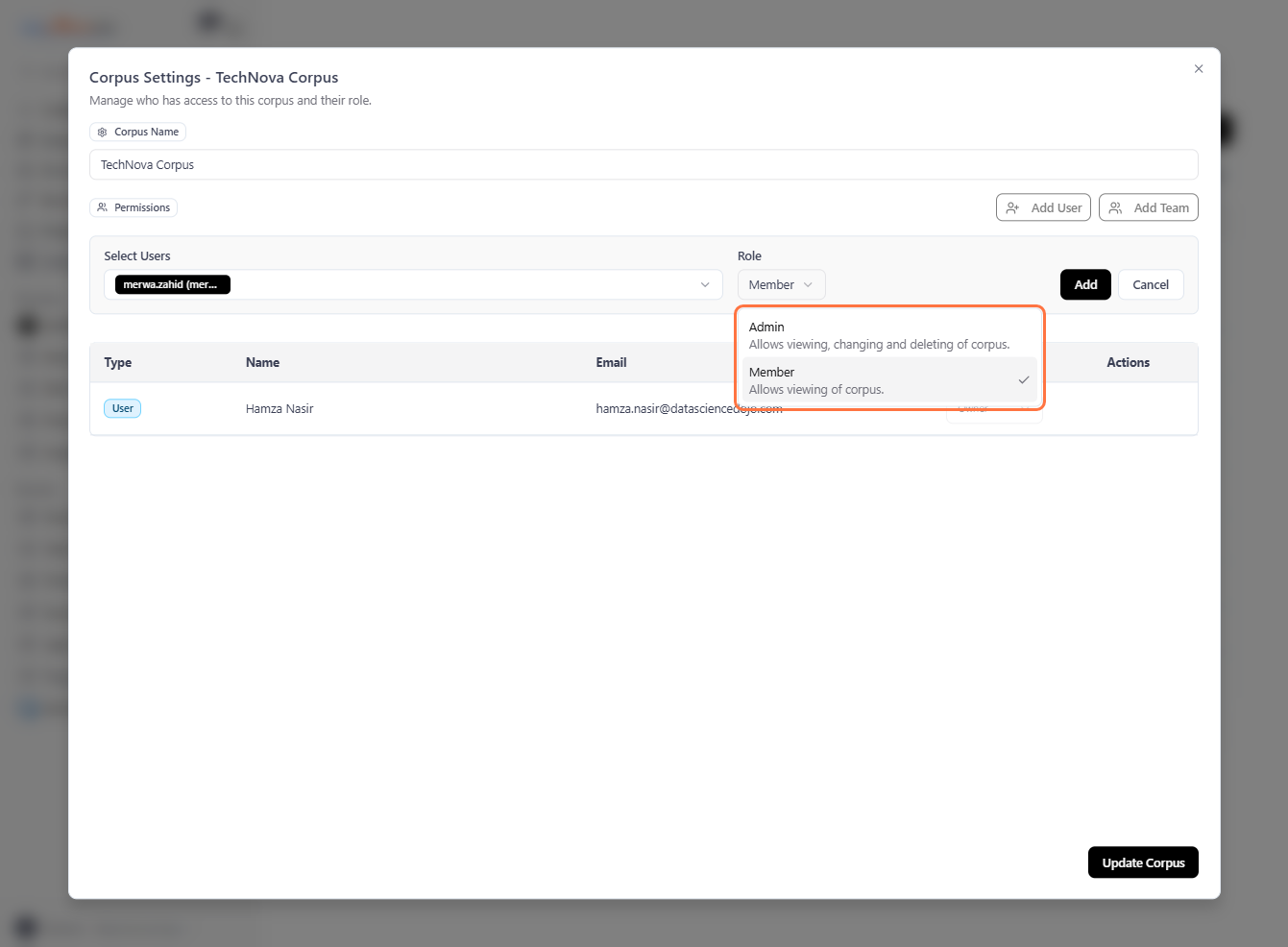
8. There are two roles available: Admin and Member. You can assign either role to a user. To learn more about these roles, please refer to this Corpus Permissions#

Corpus roles have changed. The previous Viewer role is now called Member, and the previous Editor role has been merged into Admin — an Editor could only edit, it now sits in the tier that can also re-share and delete it. Existing shares are carried over: former Viewers are Members, former Editors are Admins.
Sharing a corpus with a user does not grant actions by itself. It names which corpus a user may act on; the actions they can actually perform still come entirely from the Permission Sets they hold. In other words, a share opens the door to a specific corpus, but the Permission Set decides what the user can do once inside.
A user's access is the intersection of their share level with their capability for that action. A capability is the scope-agnostic union of every scope grant the user holds for that action across all of their assigned Permission Sets — in plain terms, "does this user have view (or edit, delete) on corpora at any scope?"
Member share — the user can view the corpus if they hold any Permission Set that grants view on corpora at any scope. A member share contributes nothing to edit or delete.
Admin share — the user can view, edit, or delete the corpus, action by action, if they hold any Permission Set that grants that same action on corpora at any scope. An admin share never unlocks an action the user has no Permission Set for.
Step 12 screenshot

9. After selecting the user and role, Click on Add#

Step 7 screenshot

10. If you want to grant corpus access to an entire team (a group of users), click on Add Team.#

Step 8 screenshot

11. Select the team you want to add to your corpus with its role.#

Sharing a corpus with a team does not grant its members access automatically. Each member gains access only if they hold a Permission Set that allows the action on corpora shared with their teams.
Member share — allows a team member to view the corpus if their Permission Set grants view on corpora shared with the user's teams. It is capped at view: the member cannot edit or delete the corpus, even if a Permission Set would otherwise grant those actions.
Admin share — allows a team member to view, edit, or delete the corpus, action by action, for each action their Permission Set grants on corpora shared with the user's teams.
Step 9 screenshot

12. After selecting the team and role, Click on Add#

Step 10 screenshot

13. After completing the edits, make sure to click Update Corpus#

Step 13 screenshot
Previous
Assistant Corpus Settings
Next
Corpus Connections